NGINX Prerequisites
NGINX acts as a reverse proxy and load balancer for Local EnteroBase. It will serve requests from the website to all the servers it is installed on.
Important Notice
All ports mentioned in this section are the default values for NGINX, however, in the following sections you may opt to change these via the NGINX config page. So please be aware that the port numbers are not final.
Because NGINX is running as a server, you need to make sure you allow the relevant ports to be forwarded in order to access it from an external browser using the public IP or URL. If your institution or server (or both) uses a proxy or a firewall, you need to make sure both 443 (https) and 80 (http) ports are open. In addition to this, if your web server is located on a different machine to the EGP singularity container you need to ensure that port 8000 is open. If not, you may run into issues like in Fig. 1 (below).

NGINX 502 Bad Gateway Error
An example of allowing NGINX to run with an enabled “Uncomplicated Firewall (ufw)”, which is default on most Ubunut installations, is as follows:
- Check if ufw is enabled using the below command. If it isn’t, then this firewall should not be an issue and you can skip the next step.
sudo ufw status
- If it is enabled, you need to run the command below.
sudo ufw allow 'Nginx Full'
NGINX Resources
This section guides you through the creation of the resources required to install and configure NGINX. It is important to have these resources ready before continuing with the installation process, especially if you choose the “Automatic Installation” option. During the installation you will be prompted to copy your resources into the relevant directories, so there is no need to formulate the exact directory (shown below) required by NGINX - just make sure you have the “nginx.conf” and certs ready.
NGINX Resource Directory Structure
nginx
    |-- nginx.conf
    |-- certs
    | |-- cert.pem
    | |-- key.pem
    |-- logs
      |-- local_enteroBase_access.log
      |-- local_enteroBase_error.log
“nginx.conf”
The “nginx.conf” file is the configuration file used by NGINX. It defines a number of features of the web server, most importantly the URL or IP address it receives requests from and the URL or IP address it forwards them to. You can learn more about the nuances of this file on the NGINX “Beginner’s Guide”, available at: http://nginx.org/en/docs/beginners_guide.html. In order to make the task of creating this file a bit easier, we have provided a webpage which takes some inputs and generates the “nginx.conf” file for you. This webpage is available at: https://enterobase.warwick.ac.uk/local_enterobase/nginx_config.
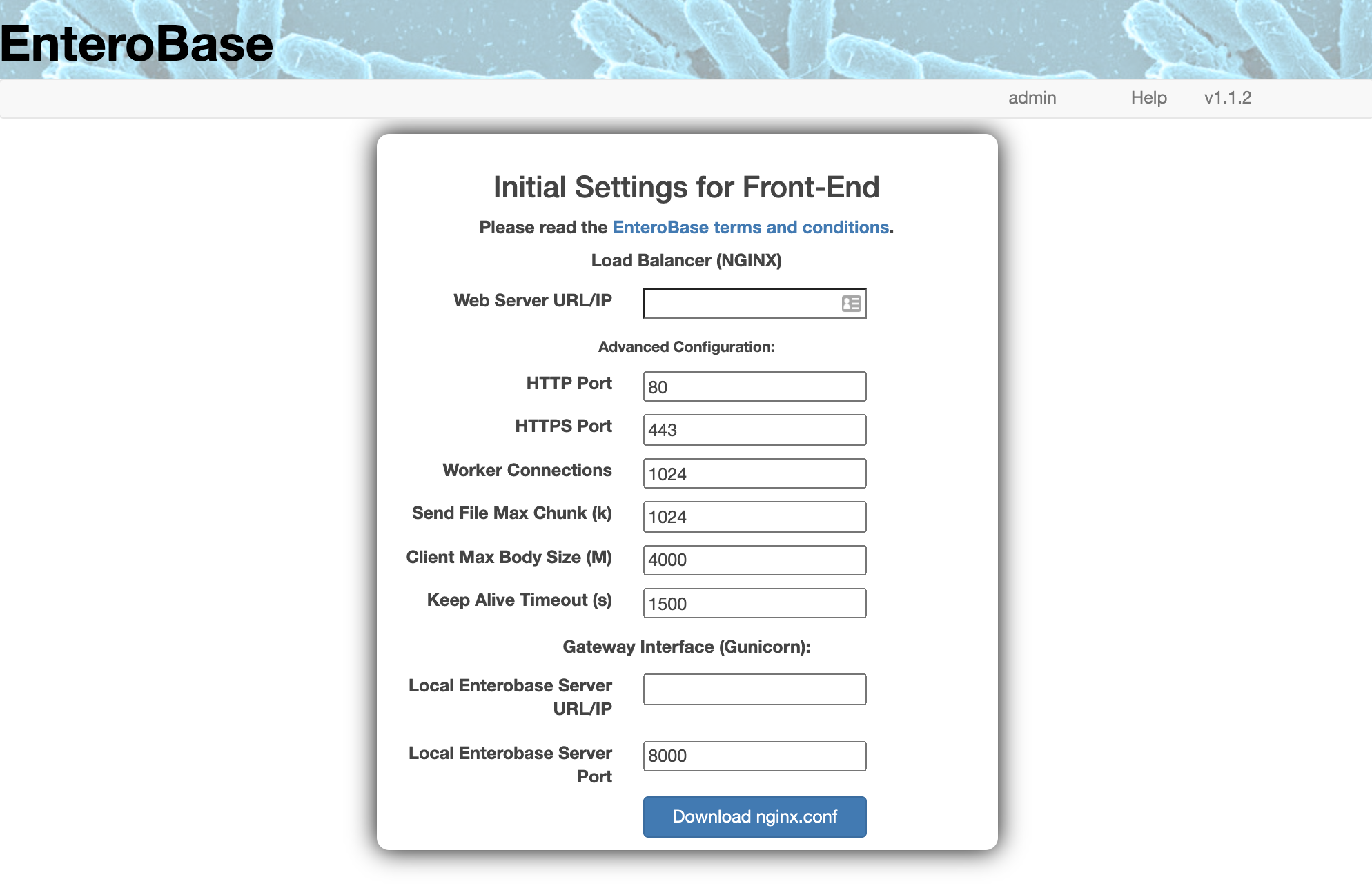
NGINX Configuration Form
The above figure shows the form that is used to generate the “nginx.conf” file. All fields in the form are mandatory. However, most come with default values which you should not modify. The values that are unique to your installation are the “Web Server URL/IP” and “Local Enterobase Server URL/IP” values. Below are some short descriptions of the required variables:
Web Server URL/IP: URL or IP address for the NGINX server hosting your local EnteroBase instance. This value usually represents the IP address of your server, which you can find by running the command:
curl https://ipinfo.io/ip.HTTP Port: Port number for HTTP access to your Local EnteroBase instance. The default value is 80.
HTTPS Port: Port number for HTTPS access to your Local EnteroBase instance. The default value is 443.
Worker Connections: The maximum number of parallel connections that the Local EnteroBase instance can handle. The default value is 1024.
Send File Max Chunk (k): The maximum amount of data that can be sent with a single send_file() call in kilobytes. The default value is 1024.
Client Max Body Size (M): The maximum upload file size that the Local EnteroBase instance can handle in megabytes. The default value is 4000.
Keep Alive Timeout (s): How long the TCP connection between the client and the server stays open after an HTTP transaction has been completed in seconds. The default value is 1500.
Local EnteroBase Server URL/IP: The URL or IP address of the server facilitating the assembly of short-read files. This value will be 127.0.0.1 (localhost) if you will be installing it on the same server as the nginx container.
Local EnteroBase Server Port: The port of the server facilitating the assembly of short-read files. The default value is 8000.
For more information on these values please visit the NGINX documentation, available at: http://nginx.org/en/docs/http/ngx_http_core_module.html.
“certs”
A valid SSL certificate is required to run Local EnteroBase using HTTPS. A self-signed certificate can be generated using the OpenSSL tutorial at: https://linuxize.com/post/creating-a-self-signed-ssl-certificate. Please ensure that you rename the generated files to match the filenames shown in the directory structure above (“key.pem” and “cert.pem”). Alternatively, you can use the certificates provided in the Docker container by default. NOTE: copying your own certs in requires a restart of the NGINX server; if you are using the automatic installer you must copy the “key.pem” and “cert.pem” files into “$HOME/nginx/certs” folder after the installation is completed, and then restart the server (this can be done using the “run_all.sh” script in the “local_enterobase_home” folder).
“logs”
The files in the “logs” folder maintain logs output by NGINX, and start off as empty files. These should be generated automatically so it’s not necessary to make these beforehand.