Administration
In order for a Local EnteroBase instance to be accepted by Central EnteroBase, a Central EnteroBase administrator needs to approve the registration request. This is done through the “/admin” endpoint of Central EnteroBase. The code associated with the developments shown in this section are located in the “entero/admin” directory of the repository.
Viewing and Approving Local EnteroBase Registration Requests
Administrator Page for Local EnteroBase Requests
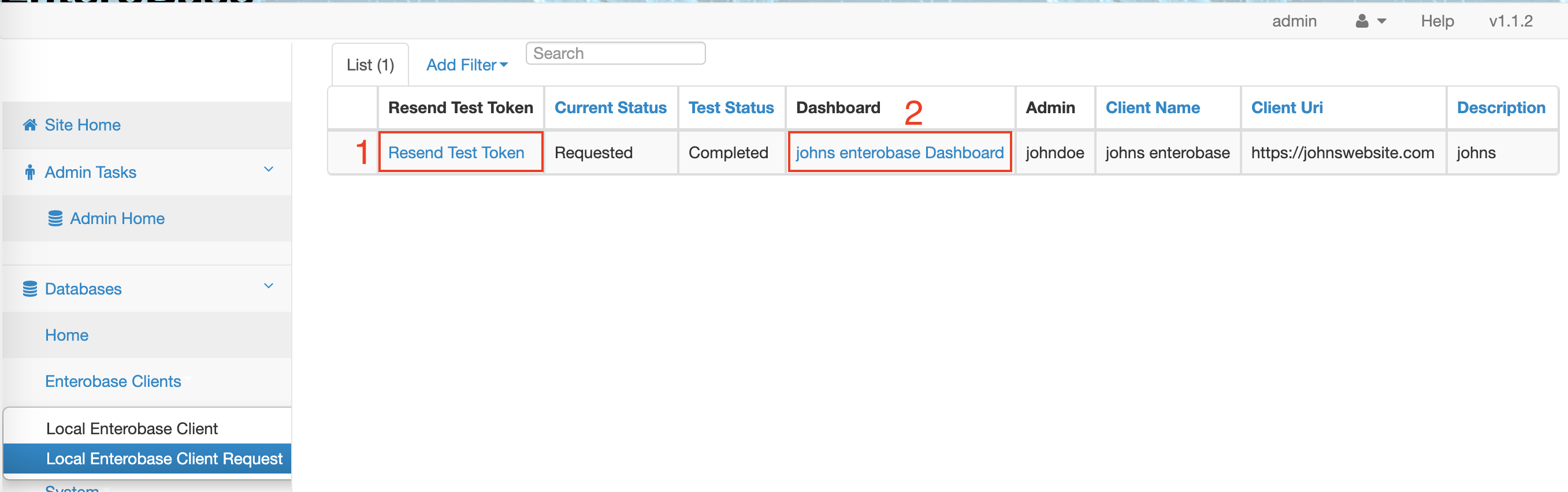
The above image shows the grid available at the “/admin/localenterobaseclientrequest” endpoint, which serves as a report of all current Local EnteroBase requests. As soon as a user submits a request to register a Local EnteroBase instance (shown in the dev docs here: Register Local EnteroBase, and in the user docs here: .. Registration), their details are added to this grid. The grid is implemented in the same style as all other admin grids in Central EnteroBase, using the sqla ModelView in the “flask_admin” library. The attributes in the grid are a subset of the attributes from the LocalEnterobaseClientRequest model in the database. All code related to this page can be found in the “entero/admin/views.py” file.
In the image there are two attributes highlighted by a red box. The box labelled “1” is a link to resend the test token to a user’s email address. The box labelled “2” is a link to the dashboard of that Local Enterobase request.
Local EnteroBase Request Dashboard
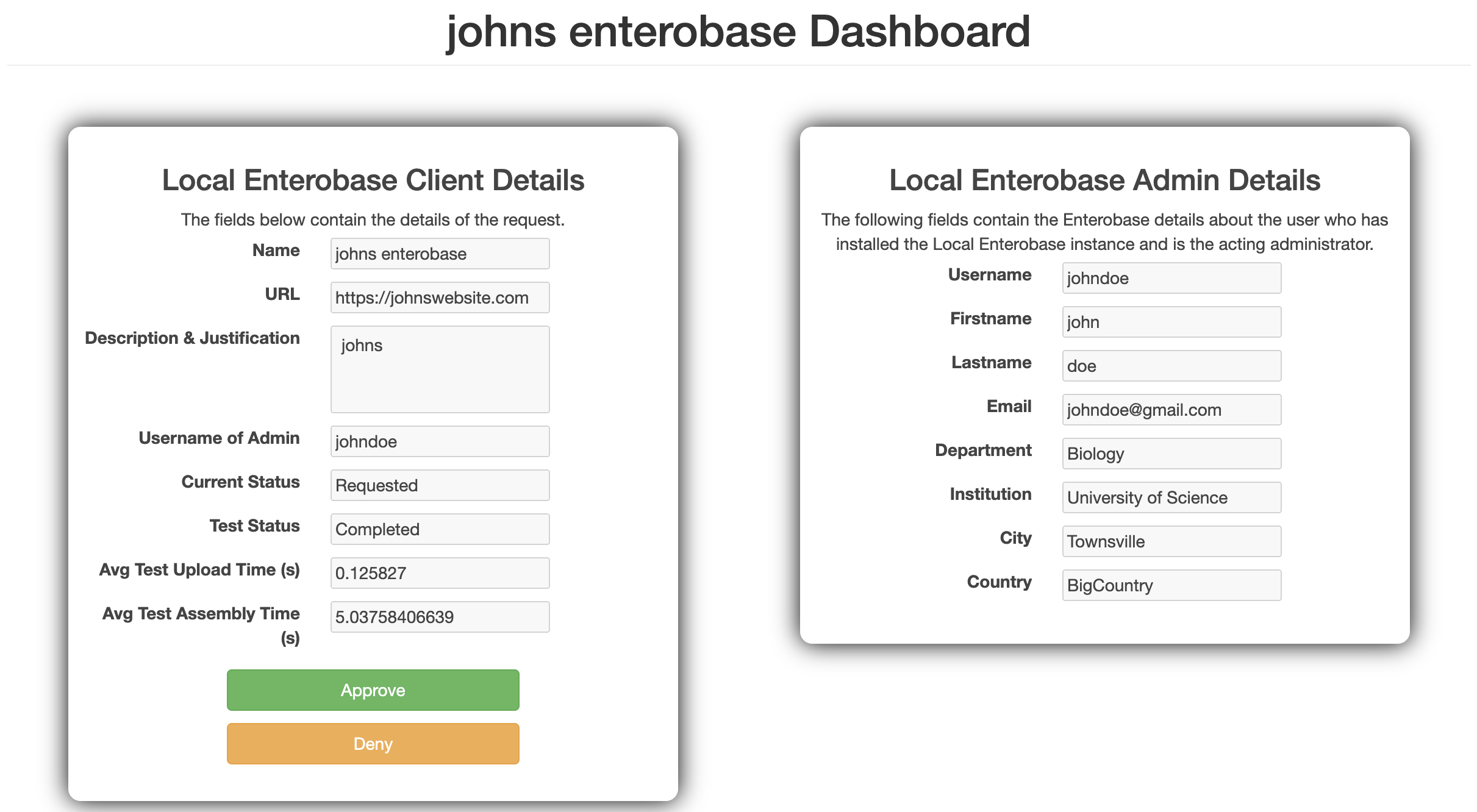
The above image shows the page that is displayed when a Central EnteroBase administrator clicks on the “Dashboard” link in the red box labelled “2” in Fig. 1. This page is available at the “admin/local_enterobase_client/<name-of-local-enterobase-instance>”. The right-hand side shows a form of the user details of the person who has requested the Local EnteroBase instance. The left-hand side shows a form of the Local EnteroBase request details. The first four fields are those filled out by the requester in the Local EnteroBase registration form (shown in the dev docs here: Register Local EnteroBase, and in the user docs here: .. Registration). The latter four fields are filled in by the system, and their relevance is as follows:
Current Status: equivalent to “current_status” in the LocalEnterobaseClientRequest SQLAlchemy model. This value is set to “Requested” because it is a Local EnteroBase client request. Stored and retrieved from the LocalEnterobaseClientTestResults model.
Test Status: either “Pending” or “Completed”, depending on whether the administrator has attempted the configuration test.
Avg Test Upload Time (s): only present if the test status is “Completed”. Shows the average time taken to upload the test upload files, in seconds. Stored and retrieved from the LocalEnterobaseClientTestResults model.
Avg Test Assembly Time (s): also only present if the test status is “Completed”. Shows the average time taken to assembly the test assembly files, in seconds. Stored and retrieved from the LocalEnterobaseClientTestResults model.
The administrator can “Approve” or “Deny” Local EnteroBase requests from this page.
If a request is approved, it is deleted from the LocalEnterobaseClientRequest model and added to the LocalEnterobaseClient model. A client id and client secret is also generated and sent to the Local EnteroBase requester (the admin) via email. The Local EnteroBase instance can then access Central EnteroBase using OAuth.
If a request is denied, the “Current Status” is set to “Denied”, however, the instance can still be approved by an admin later on.
Viewing and Managing Local EnteroBase Clients
Administrator Page for Local EnteroBase Clients
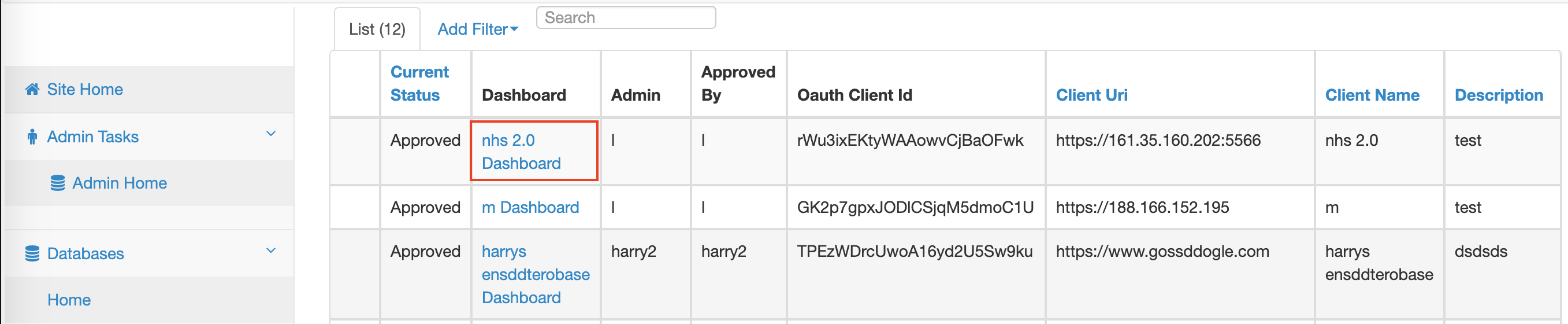
The above image shows the grid available at the “/admin/localenterobaseclient” endpoint, which serves as a report of all current Local EnteroBase clients. The attributes in the grid are a subset of the attributes from the LocalEnterobaseClient model in the database. All code related to this page can be found in the “entero/admin/views.py” file.
In the image there is an attribute highlighted by a red box which contains a link to the dashboard of that Local Enterobase client.
Local EnteroBase Client Dashboard
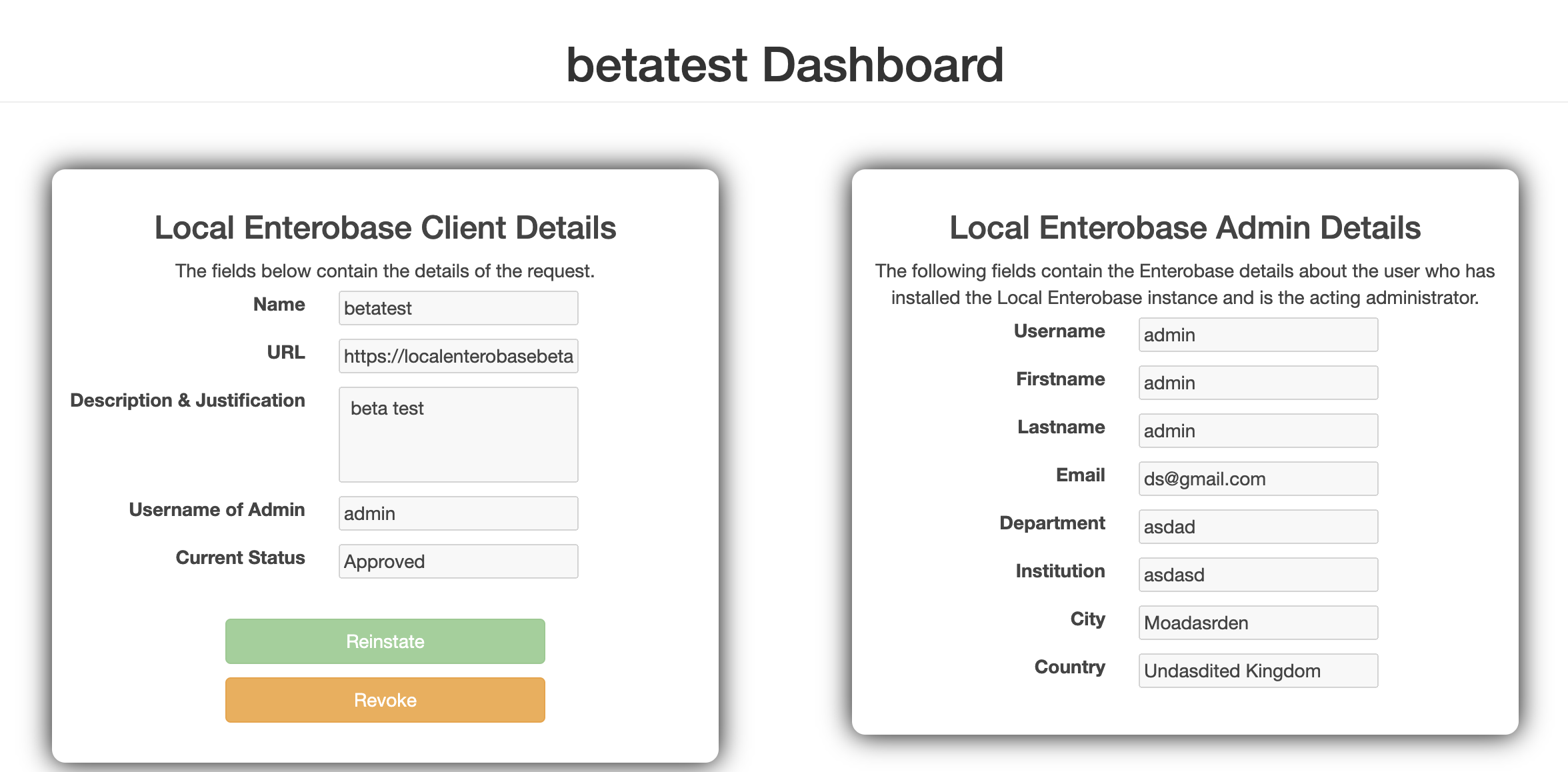
The above image shows the page that is displayed when a Central EnteroBase administrator clicks on the “Dashboard” link in the red box in Fig. 3. This page is available at the “admin/local_enterobase_client/<name-of-local-enterobase-instance>”. The right-hand side shows a form of the user details of the admin of the Local EnteroBase instance. The left-hand side shows a form of the Local EnteroBase request details. The first four fields are those filled out by the requester in the Local EnteroBase registration form (shown in the dev docs here: Register Local EnteroBase, and in the user docs here: .. Registration). The last field, “Current Status”, shows whether the Local EnteroBase instance is currently “Approved” or “Denied”. If the instance is “Approved”, the Local EnteroBase instance can function as normal. If it is “Denied”, the OAuth communications are blocked.