Bitbucket Pipelines
Bitbucket pipelines is an integrated CI/CD solution provided by Atlassian for your Bitbucket repositories. Local Enterobase makes use of this to have a CI pipeline to ensure the repository is passing all the necessary tests as well as linting the code so it conforms to a set standard. Bitbucket Pipelines work by creating Docker Images to run the project on.
The pipeline in this project has been set up to evaluate the python code for local enterobase. The pipeline is defined in a bitbucket-pipelines.yml file located in the root of the directory. It is currently defined as follows:
Running a Pipeline
The pipeline should only be executed when modifications to the python codebase or anything affecting it have been made. (E.g. don’t run it just for documentation PRs). This is because there is a limited amount of build time per month (currently 50 minutes), so it is important not to waste it.
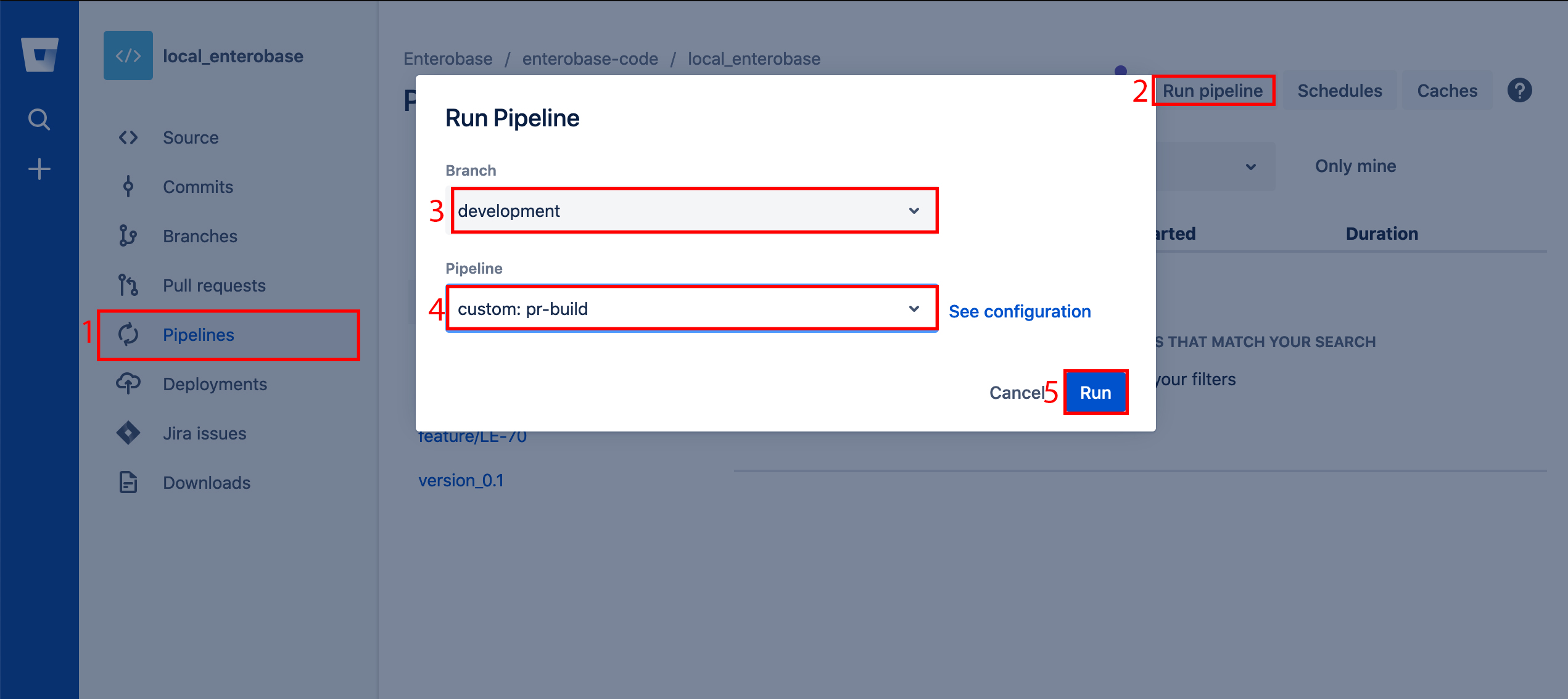
To execute the pipeline, click the pipelines tab on bitbucket on the left hand side of the screen. On this page click ‘run pipeline’ in the top right hand side. Select the branch you wish to run the pipeline on, then select the pipeline ‘custom: pr-build’ and hit run. The pipeline should now be executing.
Pipeline Definition
image: python:3.7.2

pipelines:
 custom:
   pr-build:
     - parallel:
       - step:
           name: Test
           caches:
             - pip
           script:
             - if [ -f requirements.txt ]; then pip  install -r requirements.txt; fi
             - pip install pytest
             - pip install pytest-flask
             - python3 -m pytest -m "not singularity" -v tests/* --junitxml=test-reports/report.xml
           services:
             - postgres
       - step:
           name: Lint code
           script:
             # Enforce style consistency across Python projects https://flake8.pycqa.org/en/latest/manpage.html
             - pip install flake8
             - flake8 . --extend-exclude=dist,build --show-source --statistics

definitions:
 services:
   postgres:
     image: postgres
     variables:
       POSTGRES_DB: 'local_database_test'
       POSTGRES_USER: 'postgres'
       POSTGRES_PASSWORD: 'password'
pipelines: pipeline definition
custom: this is used to define a manual pipeline. This has been done to prevent the pipeline running on every commit and wasting credits as there are only 50 minutes of build time available per month for free.
pr-build: name of the pipeline
parallel: used to run multiple steps simultaneously
step: stage in pipeline
caches: used to store state so packages don’t have to be redownloaded each time pipeline is run
script: shell instructions
definitions: used to define services
services: used to define other images needed during testing
postgres: name of service
image: name of Docker image
variables: set of env variables to use in the service
NOTE: The service variables have been defined to be compatible with the current structure of local_entero/. Do not change this unless you have good reason to.
Modifying the Pipeline
If you do wish to modify the pipeline, use this link to validate your yaml file: https://bitbucket-pipelines.prod.public.atl-paas.net/validator